Entity Detector
Description
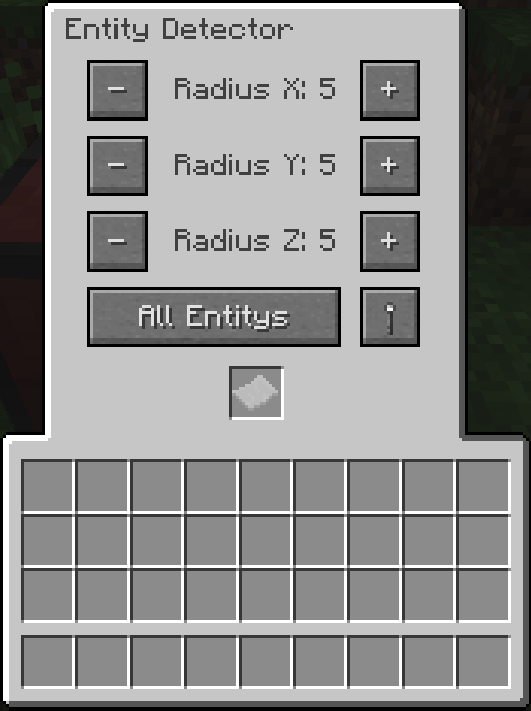
The Entity Detector is a block that emits a redstone signal when it detects entities of a specified type within a configurable radius. Right-click the block to open its GUI, where you can configure the detection radius, filter type, and output behavior.
Features
Detection Radius
The Entity Detector can detect entities in a configurable 3D radius. You can set separate ranges for X, Y, and Z axes. The maximum range for each axis is 10 blocks.
Entity Filters
The detector can filter entities by type:
- All: Detects any entity
- Living: Detects only living entities
- Animal: Detects only animals
- Monster: Detects only hostile mobs
- Player: Detects only players
- Items: Detects only item entities
- Custom: Uses an Entity Filter placed in the detector's inventory slot
Invert Mode
When invert mode is enabled, the detector's logic is reversed. For example, if the filter is set to "Players" and invert is enabled, the detector will emit a signal when any entity that is NOT a player is detected.
Power Modes
The Entity Detector has three power output modes:
- Weak: Outputs a redstone signal strength of 1 when entities are detected, 0 when not
- Strong: Outputs a redstone signal strength of 15 when entities are detected, 0 when not
- Proportional: Outputs a redstone signal strength based on the number of entities detected (1 per entity, up to 15). When invert mode is enabled, the power level decreases with entity count
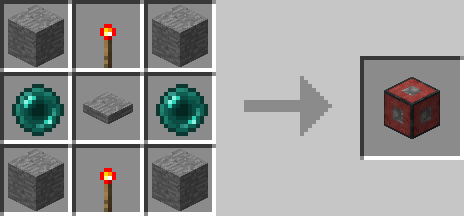
Crafting
Screenshots